Safety Alert
Introduction to the Fires Near Me NSW App
The Fires Near Me NSW app is a free mobile application designed by the New South Wales Rural Fire Service. It delivers up-to-date and accurate information on fires, planned burns, and other incidents across the state. Using the app can help you make informed decisions whether you are at home, at work, or travelling.
The app works by using your device’s GPS to show fires close to your current location. It also allows you to search for other locations within NSW to check fire activity there. This is a key tool for anyone living in or visiting bushfire-prone areas.
The interface is designed to be user-friendly, with clear icons and colour-coded indicators that make it simple to understand the current fire situation at a glance. Whether you are tech-savvy or a casual user, the app provides an accessible way to stay informed.
Beyond just showing fire locations, the Fires Near Me NSW app integrates data from multiple emergency services, ensuring the information you receive is comprehensive. This includes updates on road closures, evacuation centres, and weather conditions that may affect fire behaviour. The app’s integration with social media feeds and official announcements also helps users access a broad spectrum of safety information all in one place.
How to Download and Set Up the App
Start by downloading the Fires Near Me NSW app from the Apple App Store or Google Play Store. It is important to get the official version to ensure you receive accurate and timely information.
Once installed, open the app and allow location access so it can show fires near you. You can also set up notifications to receive alerts about new incidents or changes to existing fires in your area.
Familiarise yourself with the app’s interface. The map shows fire locations with coloured icons indicating their status. Incidents often include details such as fire size, containment, and warnings issued by emergency services.
It’s also wise to explore the app’s settings menu where you can customise your experience. Options include choosing alert sounds, frequency of updates, and preferred units of measurement. Taking a few minutes to set these preferences will make the app more effective and tailored to your needs.
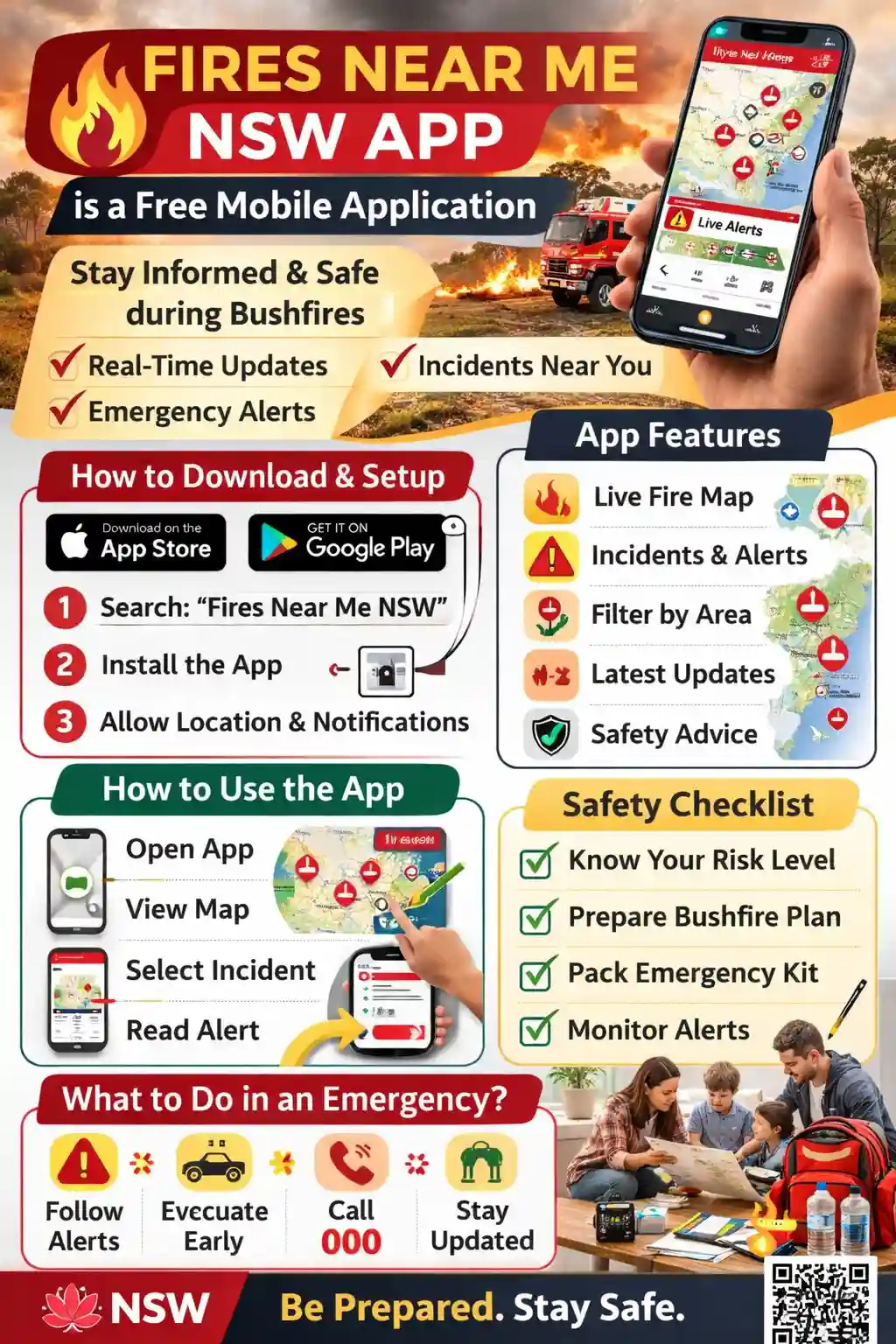 Downloadable A4 Brochure
Print this guide and keep it somewhere visible. It explains how to use the Fires Near Me NSW app, plus quick safety steps.
Additionally, the app supports offline map downloads, allowing you to access critical fire information even when mobile coverage is limited or unavailable. This feature is particularly useful if you are travelling into remote areas. Make sure to download the relevant maps ahead of time to stay connected to fire updates regardless of your connectivity.
Using the App to Monitor Fires
Checking Fire Locations
When you open the app, you will see a map with icons representing active fires and planned burns. Tap an icon to get more information including fire name, current status, size, and warnings issued.
You can zoom in or out, and pan around the map to explore other areas of NSW. This is helpful if you have family or friends elsewhere, or if you are planning travel.
The app also provides a timeline feature where you can view the progression of a fire over time. This historical data can be useful for understanding how quickly a fire is spreading and for anticipating potential risks.
In addition to fire locations, the app includes layers for weather conditions such as wind speed and direction, temperature, and humidity. These factors play a significant role in fire behaviour, so monitoring them can provide deeper insights into potential fire risks and help you plan accordingly.
Setting Up Alerts and Notifications
The app allows you to receive push notifications about incidents near you or in locations you select. Enabling alerts ensures you get timely updates on changes such as fire spread or new warnings.
To set alerts, go into the app’s settings, choose locations to monitor, and select your preferred alert types. It is best to keep notifications on during fire season to stay aware of any emerging threats.
You can also customise alerts by severity level, meaning you only receive notifications for fires at certain warning stages. This helps prevent alert fatigue while ensuring you don’t miss critical updates.
Furthermore, the app supports integration with smart home devices and wearable technology, allowing you to receive alerts through multiple channels. This multi-platform notification ensures you stay informed even if you are away from your phone.
Practical Tips for Using the App Safely
While the Fires Near Me NSW app is a valuable tool, it should complement official advice from emergency services and local authorities. Always follow instructions from the NSW Rural Fire Service and Fire & Rescue NSW.
Use the app to stay informed but do not rely on it alone for evacuation decisions. Roads may close or conditions can change rapidly. Listen to local radio, check official websites, and watch for emergency alerts.
Make sure your phone is charged and the app is updated regularly. If you lose mobile coverage, you may not receive the latest updates. Have a backup plan such as a battery pack or alternative communication method.
Additionally, consider sharing the app with family and friends so everyone in your network is informed. Establish a communication plan in case you need to evacuate or check in during an emergency.
It’s also important to understand the limitations of the app. While it strives to provide real-time updates, there may be delays due to reporting or network issues. Always cross-check information with multiple sources and remain vigilant.
For those living in bushfire-prone areas, consider setting up a bushfire survival plan that incorporates app alerts. Knowing your evacuation routes, having emergency kits ready, and understanding fire danger ratings are crucial steps to complement the information you receive through the app.
If You Only Do Five Things
First, download and install the official Fires Near Me NSW app on your smartphone. This is your direct source of fire information and warnings.
Second, enable location services and allow the app to access your position so it can display nearby fires accurately.
Third, set up notifications for your area and any other relevant locations you want to monitor closely.
Fourth, check the app regularly during fire season, even if you have no alerts, to stay aware of any new developments.
Finally, always follow official warnings and evacuation orders. Use the app as a guide, but trust the advice from emergency services above all.
Conclusion
The Fires Near Me NSW app is an important tool for anyone living in or visiting areas prone to bushfires. Understanding how to use it properly helps you stay informed and better prepared.
Remember, your safety comes first. The app complements official sources and emergency services, so always pay attention to their advice and act promptly when warnings are issued.
For more information about bushfire safety, visit the NSW Rural Fire Service website or Fire & Rescue NSW.
FireRescue Training Hub
Access practical fire and emergency study support resources, downloads, checklists, audio guides, and member-only course content.
- Course library
- PDF downloads
- Audio guides
- Checklists
Study support only. Not accredited training or a replacement for workplace procedures.
About the author and safety review
Ken Walker
Former Station Officer and fire service educator
Former career firefighter with extensive career and volunteer fire service experience.
Qualifications: Associate Diploma of Applied Science in Fire Technology; Institute of Fire Engineers studies.
Author profilehttps://www.firerescue.com.au/about-us/